
Multi-Factor Authentication
Types of Authentication Factors
MFA typically combines two or more different kinds of credentials from the categories: something you know, something you have, something you are, somewhere you are, and something you do.
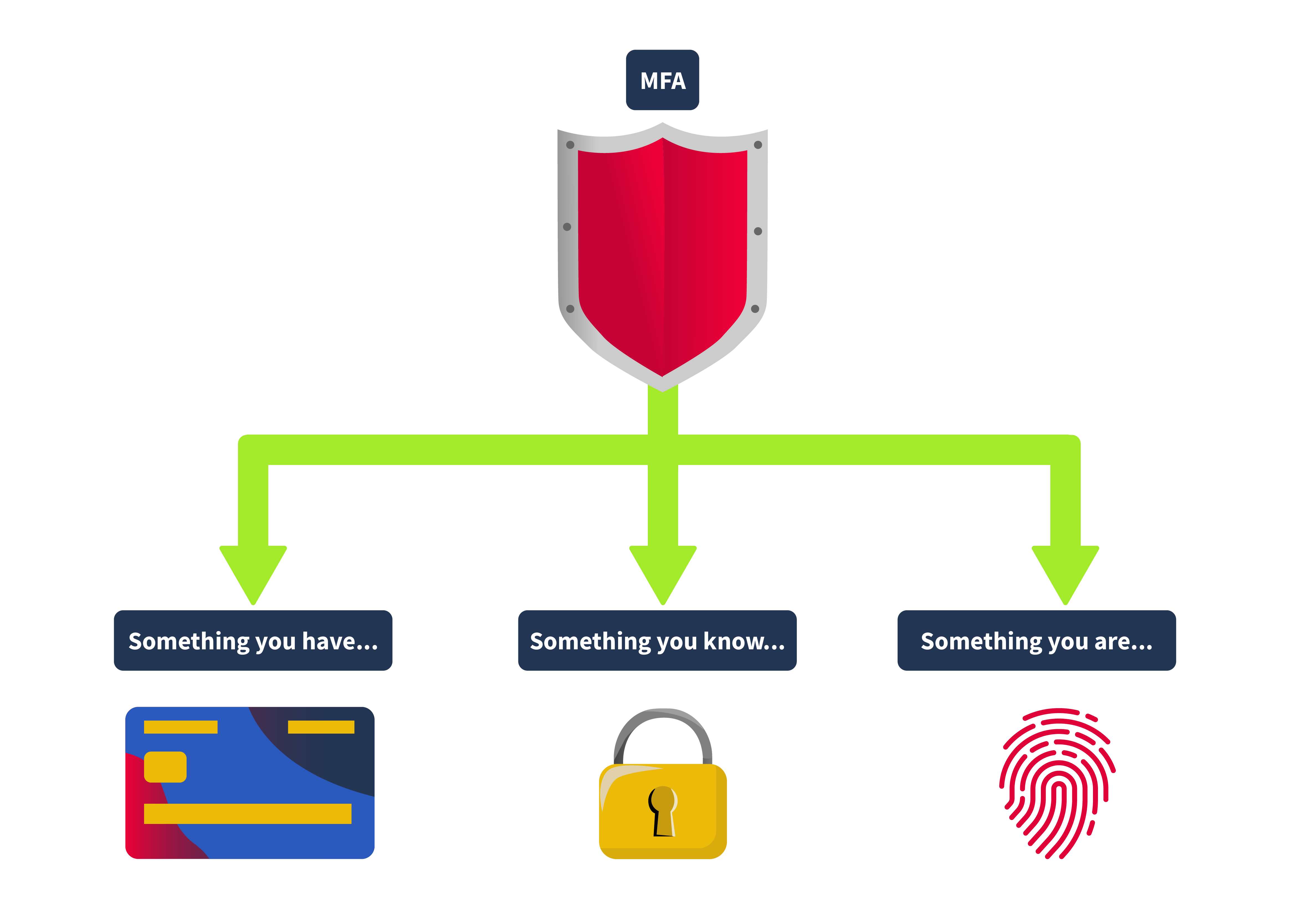
Something You Know
This could be a password, a PIN, or any other piece of info you have to remember. It forms the basis of most authentication systems but can be vulnerable if not used simultaneously with other factors.
Something You Have
This could be your phone with an authentication app, a security token, or even a smart card. Lately, we’re seeing more use of client certificates, which are like digital ID cards for devices.
Something You Are
This involves biometrics, such as fingerprints, facial recognition, or iris scans. This form of authentication is gaining popularity because it’s tough to fake and is now found in many of our gadgets, from phones to laptops. It’s important to note that a fingerprint never matches 100%, and a face scan never matches 100%. So this is the one factor that should always be supplemental and never used in pure isolation.
Somewhere You Are
This involves your origin IP address or geolocation. Some applications, like online banking services, restrict certain activity if they detect that you’re making a request from an unknown IP address.
Something You Do
This kind of authentication is usually used in applications that restrict bot interaction, like registration pages. The application typically analyses the way the user types the credentials or moves their mouse, and this is also the most difficult to implement since the application requires a specific amount of processing power.
2FA specifically requires exactly two of these factors. So, while all 2FA is MFA, not all MFA is 2FA. For example, an authentication system that requires a password, a fingerprint scan, and a smart card would be considered MFA but not 2FA.
Kinds of 2FA
2FA can utilize various mechanisms to ensure each authentication factor provides a robust security layer. Some of the most common methods include:
Time-Based One-Time Passwords (TOTP)
These are temporary passwords that change every 30 seconds or so. Apps like Google Authenticator, Microsoft Authenticator, and Authy use them, making them tough for hackers to intercept or reuse.
Push Notifications
Applications like Duo or Google Prompt send a login request straight to your phone. You can approve or deny access directly from your device, adding a layer of security that verifies possession of the device registered with the account.
An attack involving push notifications, the MFA fatigue attack, enabled an attacker to compromise the corporate account of an Uber employee. The details of this attack are out of scope for this room, but to learn more about what happened, you may visit Uber’s official security newsroom, which can be found here .
SMS
Most of the applications currently use this method. The system sends a text message with a one-time code to the user’s registered phone number. The user must enter this code to proceed with the login. While convenient, SMS-based authentication is less secure due to vulnerabilities associated with intercepting text messages.
Hardware Tokens
Devices like YubiKeys generate a one-time passcode or use NFC for authentication. They’re great because they don’t need a network or battery, so they work even offline.
Conditional Access
Conditional access is typically used by companies to adjust the authentication requirements based on different contexts. It’s like a decision tree that triggers extra security checks depending on certain conditions. For example:
Location-Based
If a user logs in from their usual location, like their office, they might only need to provide their regular login credentials. But if they’re logging in from a new or unfamiliar location, the system could ask for an additional OTP or even biometric verification.
Time-Based
During regular working hours, users might get in with just their regular login credentials. However, if someone tries to access the system after working hours, they might be prompted for an extra layer of security, like an OTP or a security token.
Behavioral Analysis
Suppose a user’s behavior suddenly changes, like they began accessing data they don’t usually view or access at odd hours. In that case, the system can ask for additional authentication to confirm it’s really them.
Device-Specific
In some cases, companies don’t allow employees to use their own devices to access corporate resources. In these situations, the system might block the user after the initial login step if they’re on an unapproved device.
Global Adoption and Regulatory Push
The adoption of MFA is rapidly expanding across various sectors due to its effectiveness in protecting against many common security threats, including phishing, social engineering, and password-based attacks. Governments and industries worldwide are recognizing the importance of MFA and are starting to mandate its use through various regulatory frameworks. For example, finance and healthcare sectors are now implementing stringent MFA requirements to comply with regulations such as GDPR in Europe, HIPAA in the United States, and PCI-DSS for payment systems globally.
Numerous breaches, such as the 2017 Equifax breach or the 2013 Target breach, could have been prevented if MFA had been in place.
Weak OTP Generation Algorithms
The security of a One-Time Password (OTP) is only as strong as the algorithm used to create it. If the algorithm is weak or too predictable, it can make the attacker’s job easier trying to guess the OTP. If an algorithm doesn’t use truly random seeds, the OTPs generated might follow a pattern, making them more susceptible to prediction.
Application Leaking the 2FA Token
If an application handles data poorly or has vulnerabilities like insecure API endpoints, it might accidentally leak the 2FA token in the application’s HTTP response.
Due to insecure coding, some applications might also leak the 2FA token in the response. A common scenario is when a user, after login, arrives on the 2FA page, the application will trigger an XHR request to an endpoint that issues the OTP. Sometimes, this XHR request returns the OTP back to the user inside the HTTP response.
Brute Forcing the OTP
Even though OTPs are designed for one-time use, they aren’t immune to brute-force attacks. If an attacker can make unlimited guesses, they might eventually get the correct OTP, especially if the OTP isn’t well protected by additional security measures. It’s like trying to crack a safe by turning the dial repeatedly until it clicks open, given enough time and no restrictions, it might just work.
Lack of Rate Limiting
Without proper rate limiting, an application is open to attackers to keep trying different OTPs without difficulty. If an attacker can submit multiple guesses in a short amount of time, it increases the likelihood that the attacker will be able to get the correct OTP.
For example, in this HackerOne report , the tester was able to report a valid bug since the application doesn’t employ rate limiting in the checking of the 2FA code.
Usage of Evilginx
Evilginx is a tool that is typically used in red team engagements. As it can be used to execute sophisticated phishing attacks, effectively bypassing Multi-Factor Authentication (MFA). It operates as a man-in-the-middle proxy that can intercept and redirect OTPs meant for legitimate users.
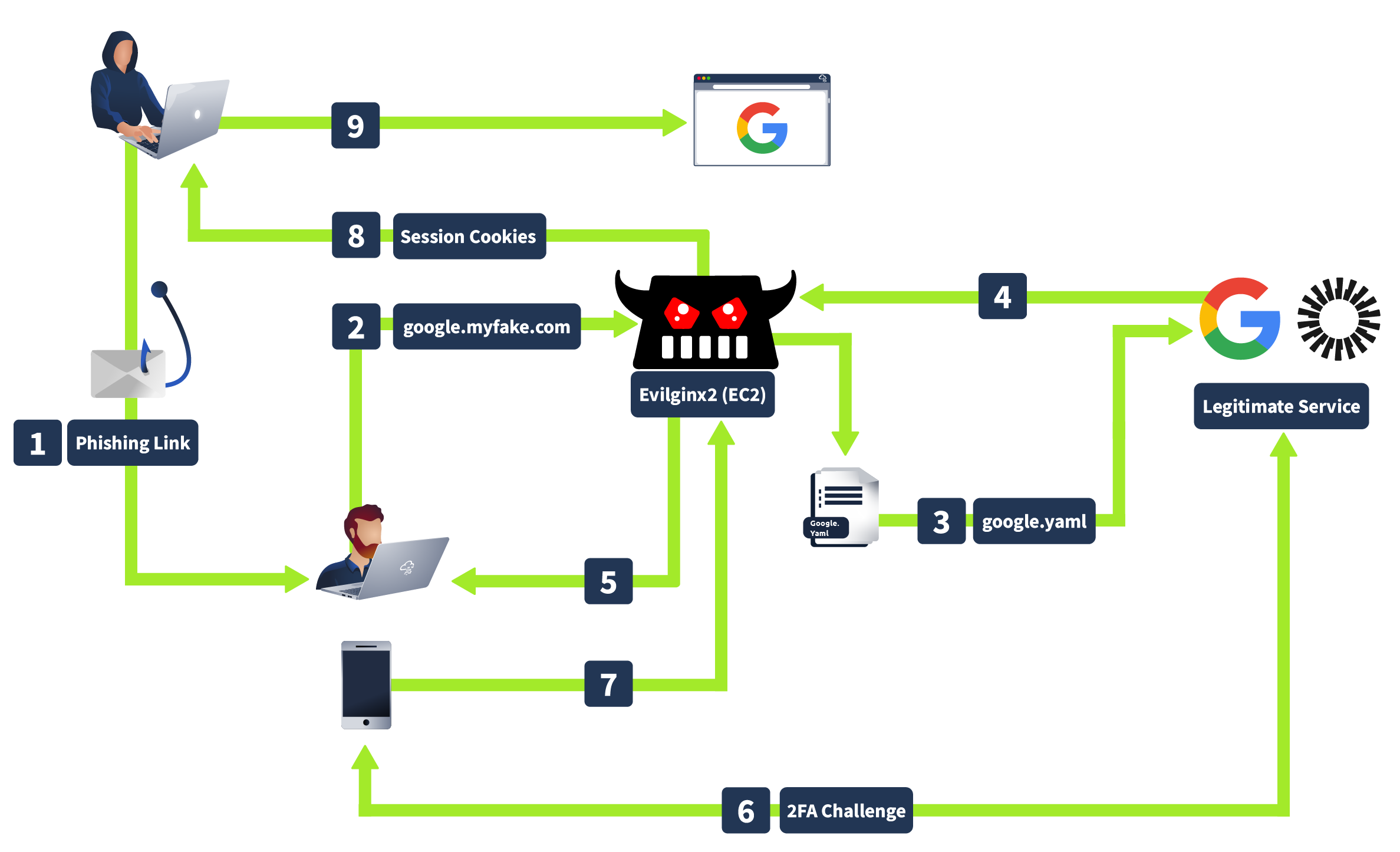
How Evilginx works is that when an attacker sends a phishing link to you, and you enter your credentials on what looks like a legitimate login page, Evilginx captures your username, password, and OTP before forwarding them to the real site, giving attackers access using your cookies without needing to crack your MFA.